
Blog article
10 Python one-liners for cleaning messy data
Ten runnable Python cleaning one-liners, with exact outputs and the edge cases to check before using them on real data.
On this page14 sections
Real data is never tidy. Names arrive with extra spaces, the same subject is spelled three ways, a number column contains “n/a”, and some rows are half empty. Before you can count or chart anything, you have to clean it.
The good news: most cleaning jobs are small and repetitive, and Python can do each one in a single readable line. This guide shows ten of them. For each one you get the messy input, the one-liner, and the exact output, so you can copy, run and compare.
1. Trim stray spaces from every value
Spaces at the start or end of text are invisible, but "Python " and "Python" are different values to Python. That breaks comparisons, grouping and lookups.
strip() every item
strip() removes spaces, tabs and line breaks from both ends. The list comprehension applies it to every item.
subjects = ["  Python", "SQL  ", " Git "]
print([s.strip() for s in subjects])['Python', 'SQL', 'Git']
2. Squash repeated spaces inside text
strip() only touches the ends. A name typed as "Alex Bennett" still has five spaces in the middle.
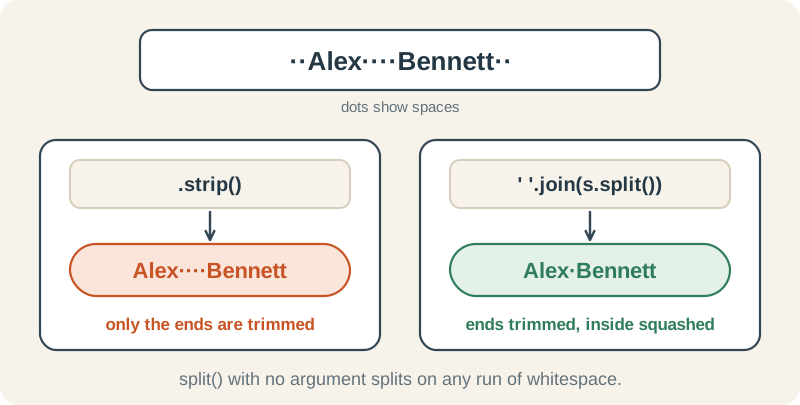
split() then join()
split() with no argument breaks text on any run of whitespace and ignores the ends, giving ['Alex', 'Bennett']. ' '.join(...) glues the pieces back with exactly one space.
name = "Alex     Bennett   "
print(" ".join(name.split()))Alex Bennett
3. Tidy name capitalisation
strip() and title()
title() applies a mechanical word-boundary rule: it turns these particular inputs into Maya Clark, Leo Evans and O'Neil. It cannot know how a person spells or capitalises their name.
names = ["  maya CLARK", "leo evans ", "o'neil"]
print([n.strip().title() for n in names])['Maya Clark', 'Leo Evans', "O'Neil"]
4. Drop blank entries
Keep only values with real text
For text values, s.strip() is empty for blank and whitespace-only entries, so they are filtered out. The kept values are unchanged: this line does not trim nonblank entries.
raw = ["Python", "", "SQL", "   ", "Git"]
print([s for s in raw if s.strip()])['Python', 'SQL', 'Git']
Why not just if s? Because " " (only spaces) is not empty, so it counts as True and would slip through: [s for s in raw if s] keeps it.
5. Fill missing values with a default
The quick version: or
x or default returns x when it is truthy, otherwise the default. Here it replaces empty text and None. Whitespace-only text is truthy, so trim it first if your data treats spaces as missing.
cities = ["London", "", None, "Leeds"]
print([c or "Unknown" for c in cities])['London', 'Unknown', 'Unknown', 'Leeds']
That works for text. With numbers it hides a bug, because 0 also counts as False:
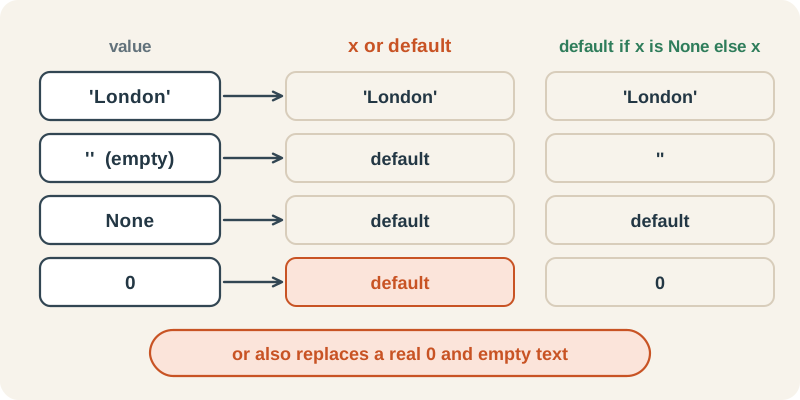
The safe version for numbers
A session that lasted 0 minutes is real data. Only None means “not recorded”, so test for it explicitly.
minutes = [20, 0, None, 35]
print([m or 30 for m in minutes])            # 0 is wrongly replaced
print([30 if m is None else m for m in minutes])[20, 30, 30, 35] [20, 0, 30, 35]
6. Remove duplicates but keep the order
set() removes duplicates, but a set has no guaranteed order, so your first-seen order is lost.
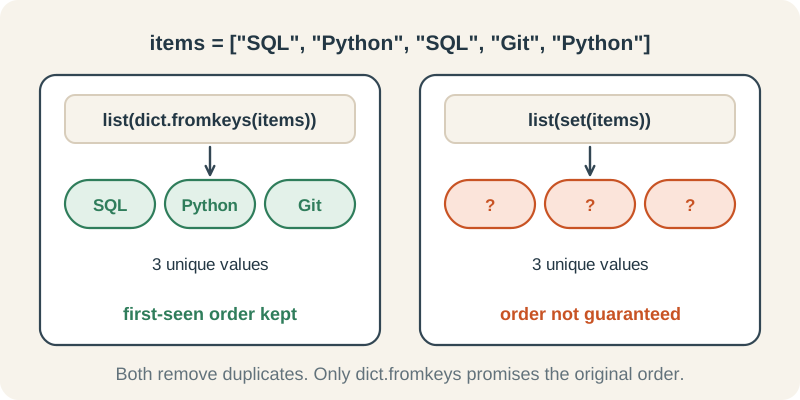
dict.fromkeys()
Each item becomes a dictionary key. Equal, hashable items are kept once, and dictionaries retain the first occurrence order. This does not merge case or spacing variants such as SQL and sql; normalise those first if they represent the same value.
items = ["SQL", "Python", "SQL", "Git", "Python"]
print(list(dict.fromkeys(items)))['SQL', 'Python', 'Git']
7. Map spelling variants to one name
People type the same thing many ways: python, PY, Python. A small dictionary of known variants fixes them all.
A lookup with a fallback
Each text value is trimmed and casefolded for lookup. aliases.get(key, fallback) returns the canonical name for a known key, otherwise the trimmed original. Unknown values such as Excel remain visible, but you should review them because new misspellings will remain separate categories.
aliases = {"py": "Python", "python": "Python", "sql": "SQL", "t-sql": "SQL", "git": "Git"}
subjects = ["python", " PY", "SQL", "t-sql ", "Git", "Excel"]
print([aliases.get(s.strip().casefold(), s.strip()) for s in subjects])['Python', 'Python', 'SQL', 'SQL', 'Git', 'Excel']
8. Parse non-negative whole numbers
Numbers read from a file are text. int("n/a") crashes with a ValueError, so check each value first.
isdecimal() as a gatekeeper
After trimming whitespace, isdecimal() accepts a non-empty string of Unicode decimal digits. int() can convert those digits, including Arabic-Indic and full-width digits. Letters, signs, decimal points and blank strings fail this filter.
minutes = ["20", " 25", "n/a", "", "30", "-5", "12.5"]
print([int(m) for m in minutes if m.strip().isdecimal()])[20, 25, 30]
9. Tidy CSV column names
Exported spreadsheets often have headers like " Subject " or "MINUTES". Then row["subject"] raises a KeyError even though the column is right there.
A dictionary comprehension over each row
For a well-formed CSV row whose headers and values are all strings, keys are trimmed and lower-cased, and values are trimmed. The example then has subject and minutes keys. This does not validate the CSV or protect against header collisions.
row = {" Subject ": " Python ", "MINUTES": "20 ", "Date ": "2026-10-01"}
print({k.strip().lower(): v.strip() for k, v in row.items()}){'subject': 'Python', 'minutes': '20', 'date': '2026-10-01'}10. Keep only complete rows
Keep required scalar fields, including zero
For scalar fields, test that each required key exists, is not None, and is not empty or whitespace-only after conversion to text. This retains numeric 0 and text "0". It is a presence check, not a validity check: it does not prove that minutes is a number or catch special values such as NaN.
rows = [
    {"subject": "Python", "minutes": "20"},
    {"subject": "", "minutes": "15"},
    {"subject": "SQL"},
    {"subject": "Git", "minutes": "10"},
    {"subject": "  ", "minutes": "12"},
    {"subject": "Python", "minutes": 0},
]
required = ("subject", "minutes")
print([r for r in rows if all(k in r and r[k] is not None and str(r[k]).strip() for k in required)])[{'subject': 'Python', 'minutes': '20'}, {'subject': 'Git', 'minutes': '10'}, {'subject': 'Python', 'minutes': 0}]Put it together: a 4-line cleaning pipeline
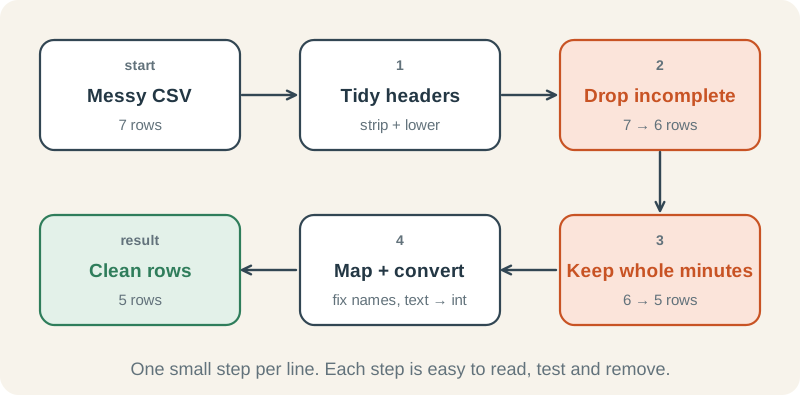
Here is a messy export of study sessions. It has untidy headers, mixed spellings, a blank subject and an n/a. Each line of the pipeline is one of the one-liners above.
Clean a messy CSV in four steps
This demonstration starts with a known, well-formed two-column CSV. Tidy each row (9), keep complete rows (10), keep non-negative whole-minute strings (8), then map aliases and convert to int (7 and 8). The loop totals minutes by subject.
import csv
import io
from collections import Counter

messy = """ Subject ,MINUTES
  python ,20
SQL, 25
py,n/a
 ,15
t-sql ,30
Python,20
Git,10
"""

aliases = {"py": "Python", "python": "Python", "sql": "SQL", "t-sql": "SQL", "git": "Git"}

rows = [{k.strip().lower(): v.strip() for k, v in row.items()} for row in csv.DictReader(io.StringIO(messy))]
rows = [r for r in rows if all(r.get(k) for k in ("subject", "minutes"))]
rows = [r for r in rows if r["minutes"].isdecimal()]
rows = [{"subject": aliases.get(r["subject"].casefold(), r["subject"]), "minutes": int(r["minutes"])} for r in rows]

totals = Counter()
for r in rows:
    totals[r["subject"]] += r["minutes"]
print(dict(totals)){'Python': 40, 'SQL': 55, 'Git': 10}| Step | Rows left | What happened |
|---|---|---|
| Read the CSV | 7 | Headers are " Subject " and "MINUTES" |
| Tidy keys and values | 7 | Headers become subject and minutes |
| Keep complete rows | 6 | The row with a blank subject is removed |
| Keep real numbers | 5 | The py,n/a row is removed |
| Map and convert | 5 | python becomes Python and t-sql becomes SQL; minutes become numbers |
Cheat sheet
| Problem | One-liner | Watch out for |
|---|---|---|
| Spaces at the ends | [s.strip() for s in xs] | Inner spaces stay |
| Repeated inner spaces | ' '.join(s.split()) | Also trims the ends |
| Messy name case | s.strip().title() | May change a person’s preferred spelling |
| Blank values | [s for s in xs if s.strip()] | Kept values are not trimmed |
| Missing values | [x or default for x in xs] | Also replaces 0; whitespace is not empty |
| Duplicates | list(dict.fromkeys(xs)) | Requires hashable items; normalise variants first |
| Spelling variants | aliases.get(s.strip().casefold(), s.strip()) | Review unknown values for new aliases |
| Text to int | [int(m) for m in xs if m.strip().isdecimal()] | Only non-negative whole numbers; rejected values disappear |
| Messy headers | {k.strip().lower(): v.strip() for k, v in row.items()} | String fields only; check duplicate headers and row widths |
| Incomplete rows | [r for r in rows if all(k in r and r[k] is not None and str(r[k]).strip() for k in required)] | Presence only; numeric 0 kept; types still need validation |
Try it yourself
What does ' '.join(' a b '.split()) return?
Reveal answer
'a b'. split() gives ['a', 'b'], and join puts one space between them.
Remove the duplicates from ['b', 'a', 'b', 'c', 'a'] but keep the first-seen order.
Reveal answer
print(list(dict.fromkeys(['b', 'a', 'b', 'c', 'a'])))list(dict.fromkeys(...)) returns ['b', 'a', 'c'].
Convert ['10', 'x', ' 7 ', '3.5'] to whole numbers, skipping anything that is not one.
Reveal answer
print([int(m) for m in ['10', 'x', ' 7 ', '3.5'] if m.strip().isdecimal()])The result is [10, 7]. 'x' and '3.5' fail isdecimal(), and ' 7 ' passes once it is stripped.
Where to go next
These lessons in the Python roadmap go deeper into each idea:
- Useful string methods: strip, split, join and title
- Slicing and comprehensions: the list and dict comprehensions used throughout
- Dictionaries and key lookup: get() with a default
- Sets and unique values: when a set is the right tool
- Clean and validate CSV rows: turning these one-liners into a reusable cleaning step