
Blog article
5 SQL mistakes that silently return wrong answers
Five SQL Server mistakes that run without an error but return the wrong answer, each explained with a diagram and a fix you can run on the practice dataset.
On this page8 sections
Some SQL mistakes crash with a red error message. Those are the friendly ones. The dangerous mistakes run perfectly, return a neat result, and the numbers are simply wrong. Nobody notices until a report goes out.
This guide covers five of them. Each one follows the same pattern: the mistake, a diagram of the query's logical effect, and the fix. The stated results use the unmodified DDI SQL Server practice dataset v1.0.0; if you change its rows, your results may differ.
Mistake 1: Checking for missing values with = NULL
You want the customers who have not given an email address. This looks reasonable:
SELECT CustomerID, FirstName, LastName
FROM dbo.Customers
WHERE Email = NULL;It runs without an error and returns 0 rows. But four customers have no email address. Where did they go?
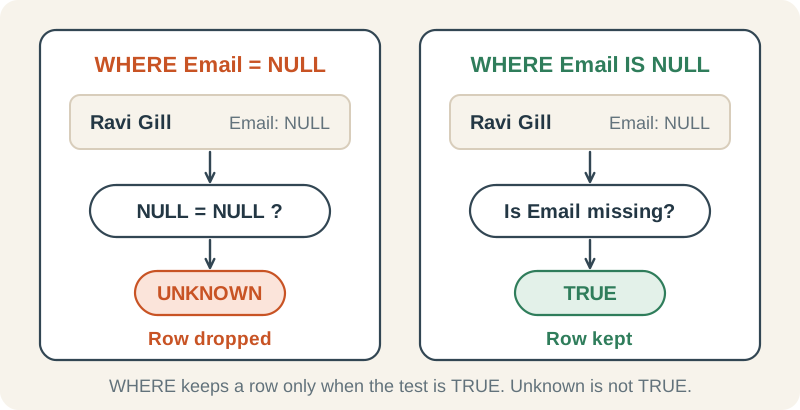
Why it happens. NULL marks a missing value, which may mean unknown, not applicable or not yet recorded; it is not the same as 0 or an empty string. With ANSI_NULLS ON (the default in SSMS and modern drivers; switching it OFF is deprecated), comparing any value with NULL using = gives UNKNOWN. A WHERE clause only keeps rows where the test is TRUE, so every row disappears.
The fix: use IS NULL
IS NULL asks a yes-or-no question: is this value missing? The answer is always TRUE or FALSE, never UNKNOWN.
SELECT CustomerID, FirstName, LastName
FROM dbo.Customers
WHERE Email IS NULL
ORDER BY CustomerID;| CustomerID | FirstName | LastName |
|---|---|---|
| 5 | Ravi | Gill |
| 10 | Ada | Lam |
| 15 | Arjun | Qureshi |
| 20 | Imani | Vale |
Mistake 2: NOT IN with a list that contains NULL
You want the employees who don't manage anyone. Managers are the IDs that appear in the ManagerID column, so you write:
SELECT EmployeeID, FirstName
FROM dbo.Employees
WHERE EmployeeID NOT IN (SELECT ManagerID FROM dbo.Employees);Again: no error, 0 rows. Yet only three of the twelve employees are managers.
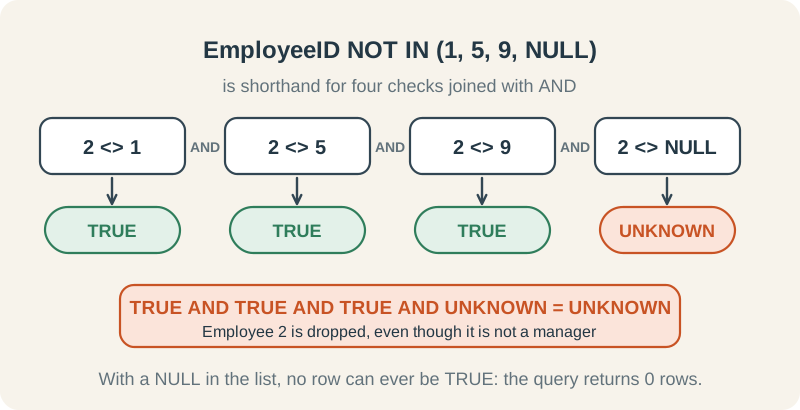
Why it happens. The three top managers (Amina, Oliver and Priya) have no manager themselves, so their ManagerID is NULL. The subquery's results therefore contain 1, 5, 9 (several times over) plus NULL. NOT IN means “not equal to every item in the list”, joined with AND. For a non-manager, the known-ID checks are TRUE but the NULL check is UNKNOWN, so the result is UNKNOWN. For a manager, one known-ID check is FALSE, so the result is FALSE. WHERE keeps neither.
The fix: use NOT EXISTS
NOT EXISTS asks whether any row satisfies the correlated match, producing TRUE or FALSE. Here EmployeeID is non-null, so rows with a NULL ManagerID cannot match it or spoil the test. This is a reliable pattern for finding rows with no match on a non-null key.
SELECT e.EmployeeID, e.FirstName
FROM dbo.Employees AS e
WHERE NOT EXISTS (
    SELECT 1
    FROM dbo.Employees AS reports
    WHERE reports.ManagerID = e.EmployeeID
)
ORDER BY e.EmployeeID;| EmployeeID | FirstName |
|---|---|
| 2 | Grace |
| 3 | Marcus |
| 4 | Sofia |
| 6 | Daniel |
| 7 | Leah |
| 8 | Noah |
| 10 | Fatima |
| 11 | James |
| 12 | Eva |
Mistake 3: A WHERE filter that cancels your LEFT JOIN
You want every department with its number of new hires since 1 January 2023, including departments with none. A LEFT JOIN keeps every department, so this should work:
Looks right
It runs without an error. Check the result against the four departments you expect.
SELECT d.DepartmentName, COUNT(e.EmployeeID) AS NewHires
FROM dbo.Departments AS d
LEFT JOIN dbo.Employees AS e
    ON e.DepartmentID = d.DepartmentID
WHERE e.HireDate >= '20230101'
GROUP BY d.DepartmentName
ORDER BY d.DepartmentName;| DepartmentName | NewHires |
|---|---|
| Finance | 1 |
| Sales | 1 |
| Technology | 1 |
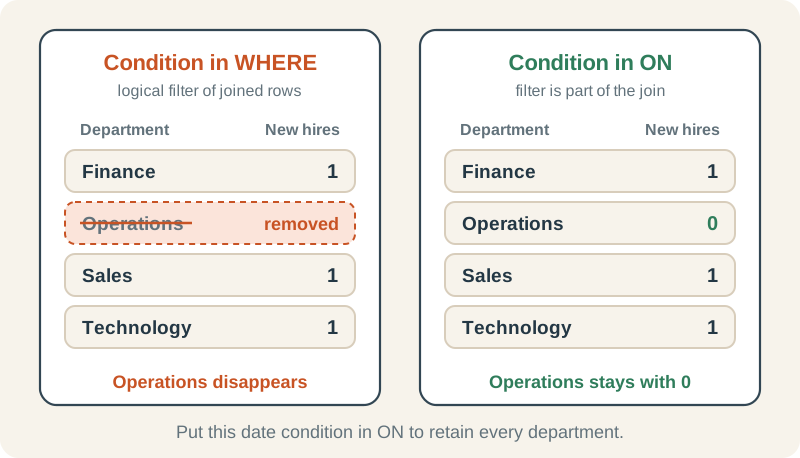
Why it happens. Logically, the LEFT JOIN preserves departments before WHERE filters the result. Nobody in Operations was hired in 2023 or later, so its joined rows fail the date test. The final result omits Operations, just as an INNER JOIN with this filter would. SQL Server may use a different physical execution plan.
The fix: move the condition into ON
In ON, the date becomes part of the matching rule: “join employees from this department who were hired since 2023”. Departments with no such employee still appear. COUNT(e.EmployeeID) ignores the NULL on an unmatched row and returns 0; COUNT(*) would count that row as 1.
SELECT d.DepartmentName, COUNT(e.EmployeeID) AS NewHires
FROM dbo.Departments AS d
LEFT JOIN dbo.Employees AS e
    ON e.DepartmentID = d.DepartmentID
   AND e.HireDate >= '20230101'
GROUP BY d.DepartmentName
ORDER BY d.DepartmentName;| DepartmentName | NewHires |
|---|---|
| Finance | 1 |
| Operations | 0 |
| Sales | 1 |
| Technology | 1 |
Mistake 4: A join that doubles payment totals
You want total payment amounts and item quantities for paid orders, grouped by payment method. Payments holds one amount per paid order, and OrderItems holds the quantities, so you join them:
Looks right
It runs without an error, and the payment totals look plausible.
SELECT p.PaymentMethod,
       SUM(p.Amount)     AS TotalPaid,
       SUM(oi.Quantity)  AS ItemsSold
FROM dbo.Payments AS p
JOIN dbo.OrderItems AS oi
    ON oi.OrderID = p.OrderID
GROUP BY p.PaymentMethod
ORDER BY p.PaymentMethod;| PaymentMethod | TotalPaid | ItemsSold |
|---|---|---|
| Bank | 472549.00 | 3333 |
| Card | 514924.00 | 3336 |
| Cash | 499222.00 | 3331 |
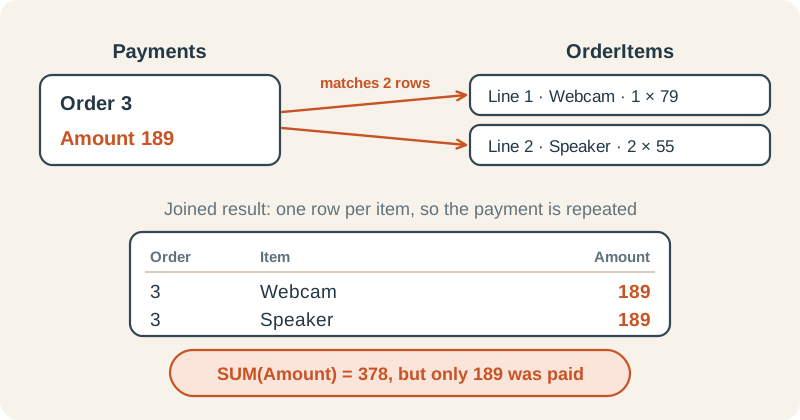
Why it happens. Each paid order has one payment but two order lines. A join produces one row per matching pair, so every payment appears twice. SUM(p.Amount) then adds each payment twice. Each item quantity still appears once because this dataset has exactly one payment per paid order. That makes the mistake harder to spot.
Quick check: SELECT SUM(Amount) FROM dbo.Payments; returns 743,347.50. Add up the TotalPaid column above and you get 1,486,695.00: exactly double. Every payment was counted twice.
The fix: summarise before you join
Collapse OrderItems to one row per order first, then join. Now each payment meets exactly one row.
WITH ItemsPerOrder AS (
    SELECT OrderID, SUM(Quantity) AS Items
    FROM dbo.OrderItems
    GROUP BY OrderID
)
SELECT p.PaymentMethod,
       SUM(p.Amount) AS TotalPaid,
       SUM(i.Items)  AS ItemsSold
FROM dbo.Payments AS p
JOIN ItemsPerOrder AS i
    ON i.OrderID = p.OrderID
GROUP BY p.PaymentMethod
ORDER BY p.PaymentMethod;| PaymentMethod | TotalPaid | ItemsSold |
|---|---|---|
| Bank | 236274.50 | 3333 |
| Card | 257462.00 | 3336 |
| Cash | 249611.00 | 3331 |
Mistake 5: Integer division that truncates to zero
What share of orders were cancelled? Count the cancelled ones and divide by all orders:
Looks right
1,250 of 5,000 orders were cancelled, so you expect 0.25 (25%).
SELECT SUM(CASE WHEN OrderStatus = N'Cancelled' THEN 1 ELSE 0 END)
       / COUNT(*) AS CancelledRate
FROM dbo.Orders;| CancelledRate |
|---|
| 0 |
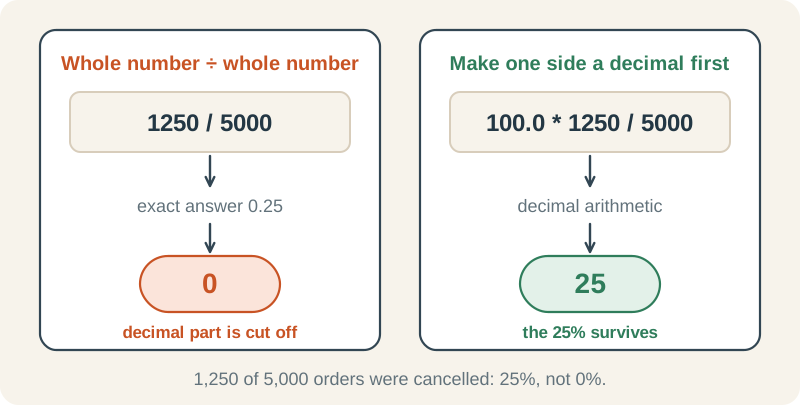
Why it happens. SUM(...) and COUNT(*) both return whole numbers (int). In SQL Server, int divided by int gives an int, and the decimal part is simply cut off. 0.25 becomes 0. No rounding, no warning.
The fix: bring in a decimal before dividing
Multiplying by 100.0 (a decimal) switches the calculation to decimal arithmetic. CAST converts the percentage to decimal(5,2), a numeric result rounded to two digits after the decimal point.
SELECT CAST(100.0 * SUM(CASE WHEN OrderStatus = N'Cancelled' THEN 1 ELSE 0 END)
            / COUNT(*) AS decimal(5,2)) AS CancelledPct
FROM dbo.Orders;| CancelledPct |
|---|
| 25.00 |
Quick checklist
Keep this next to your editor. Each line is a two-second check before you trust a result.
| Mistake | Warning sign | Fix |
|---|---|---|
| = NULL or <> NULL | Filter returns 0 rows unexpectedly | Use IS NULL / IS NOT NULL |
| NOT IN (subquery) | Anti-join returns 0 rows | Use NOT EXISTS |
| WHERE on a LEFT JOIN's right table | Rows with no match vanish | Move the condition into ON |
| SUM after a one-to-many join | Totals change unexpectedly after the join | Summarise first, then join |
| int / int | Rates and averages come out as 0 or whole numbers | Multiply by 100.0 (or 1.0), or CAST to decimal, before dividing |
Try it yourself
How many customers DO have an email address? Write the query without using = NULL.
Reveal answer
SELECT COUNT(*) AS CustomersWithEmail
FROM dbo.Customers
WHERE Email IS NOT NULL;| CustomersWithEmail |
|---|
| 16 |
Use IS NOT NULL. It returns 16 customers.
Customer 2 has 250 orders, and every order has 2 items. Joining Orders to OrderItems and using COUNT(*) for customer 2 gives 500. How do you get 250?
Reveal answer
SELECT o.CustomerID, COUNT(DISTINCT o.OrderID) AS Orders
FROM dbo.Orders AS o
JOIN dbo.OrderItems AS oi ON oi.OrderID = o.OrderID
WHERE o.CustomerID = 2
GROUP BY o.CustomerID;| CustomerID | Orders |
|---|---|
| 2 | 250 |
Count each order once with COUNT(DISTINCT o.OrderID). This is mistake 4 again: one order matches two item rows. If you don't need any OrderItems columns, skip the join and use COUNT(*) on Orders alone.
What does SELECT 7 / 2; return in SQL Server, and how would you get 3.5?
Reveal answer
7 / 2 returns 3 because both numbers are integers. Make one of them a decimal: SELECT 7 / 2.0; returns 3.500000.
Where to go next
Each mistake is covered in depth in the SQL Server roadmap:
- IS NULL and missing values: mistake 1
- EXISTS and NOT EXISTS: mistake 2
- LEFT and RIGHT OUTER JOIN: mistake 3
- Diagnosing duplicate or missing rows after joins: mistake 4
- CAST, CONVERT, and safe conversions: mistake 5