
Blog article
Window functions for beginners: ROW_NUMBER, RANK and running totals
GROUP BY loses the rows; window functions keep them. Learn OVER, PARTITION BY, ROW_NUMBER, RANK, DENSE_RANK and running totals with diagrams and exact results on the SQL Server practice dataset.
On this page10 sections
Your manager wants a list of the top earner in each department, with their names. GROUP BY gets you the top salary in each department, then stops: the moment you group, the individual rows, and the names in them, are gone.
Window functions solve exactly this. They calculate across a set of related rows, like GROUP BY does, but they keep every row. This guide covers the three you will use most: ROW_NUMBER, RANK (with its sibling DENSE_RANK) and running totals.
GROUP BY answers half the question
You get the highest salary in each department, but not who earns it. Add FirstName to the SELECT and SQL Server refuses, because a group of four people has no single first name (error 8120).
SELECT DepartmentID, MAX(AnnualSalary) AS TopSalary
FROM dbo.Employees
GROUP BY DepartmentID
ORDER BY DepartmentID;| DepartmentID | TopSalary |
|---|---|
| 1 | 62000.00 |
| 2 | 64000.00 |
| 3 | 66000.00 |
| 4 | 52000.00 |
What OVER does
Put OVER (...) after a function and it becomes a window function. The parentheses describe the window: the rows the function may look at for each row. PARTITION BY splits rows into groups, like GROUP BY, but without merging them. ORDER BY inside OVER sets an order within each group, which numbering and running totals need.
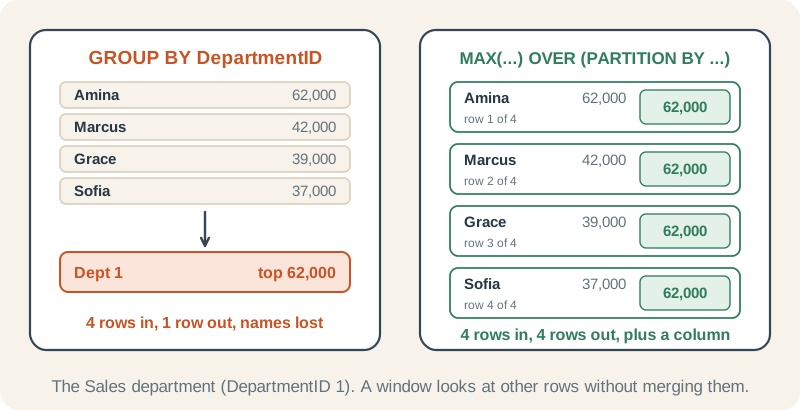
OVER keeps every row
Same maximum, but all 12 employees are still here. PARTITION BY DepartmentID means “work out the maximum separately for each department”.
SELECT EmployeeID, FirstName, DepartmentID, AnnualSalary,
       MAX(AnnualSalary) OVER (PARTITION BY DepartmentID) AS DeptTopSalary
FROM dbo.Employees
ORDER BY DepartmentID, AnnualSalary DESC;| EmployeeID | FirstName | DepartmentID | AnnualSalary | DeptTopSalary |
|---|---|---|---|---|
| 1 | Amina | 1 | 62000.00 | 62000.00 |
| 3 | Marcus | 1 | 42000.00 | 62000.00 |
| 2 | Grace | 1 | 39000.00 | 62000.00 |
| 4 | Sofia | 1 | 37000.00 | 62000.00 |
| 5 | Oliver | 2 | 64000.00 | 64000.00 |
| 6 | Daniel | 2 | 41000.00 | 64000.00 |
| 7 | Leah | 2 | 40000.00 | 64000.00 |
| 9 | Priya | 3 | 66000.00 | 66000.00 |
| 10 | Fatima | 3 | 43000.00 | 66000.00 |
| 11 | James | 3 | 41000.00 | 66000.00 |
| 8 | Noah | 4 | 52000.00 | 52000.00 |
| 12 | Eva | 4 | 50000.00 | 52000.00 |
ROW_NUMBER: number the rows
ROW_NUMBER() gives each row in a partition a number: 1, 2, 3 and so on, in the order you choose. With PARTITION BY, numbering restarts for each group.
Number the employees in each department
The numbering starts again at 1 for every department, highest salary first. EmployeeID at the end of the ORDER BY is a tiebreaker: if two people in a department ever earn the same, the numbers still come out the same every time.
SELECT DepartmentID, FirstName, AnnualSalary,
       ROW_NUMBER() OVER (PARTITION BY DepartmentID
                          ORDER BY AnnualSalary DESC, EmployeeID) AS SalaryRank
FROM dbo.Employees
ORDER BY DepartmentID, SalaryRank;| DepartmentID | FirstName | AnnualSalary | SalaryRank |
|---|---|---|---|
| 1 | Amina | 62000.00 | 1 |
| 1 | Marcus | 42000.00 | 2 |
| 1 | Grace | 39000.00 | 3 |
| 1 | Sofia | 37000.00 | 4 |
| 2 | Oliver | 64000.00 | 1 |
| 2 | Daniel | 41000.00 | 2 |
| 2 | Leah | 40000.00 | 3 |
| 3 | Priya | 66000.00 | 1 |
| 3 | Fatima | 43000.00 | 2 |
| 3 | James | 41000.00 | 3 |
| 4 | Noah | 52000.00 | 1 |
| 4 | Eva | 50000.00 | 2 |
Now the opening question is easy: number the employees in each department by salary, then keep number 1. You cannot write WHERE SalaryRank = 1 in the same query (more on that below), so number them in a CTE first.
The top earner in each department
Number the rows inside a CTE, then keep number 1. Change = 1 to <= 2 and you get the top two per department.
WITH Ranked AS (
    SELECT d.DepartmentName, e.FirstName, e.LastName, e.AnnualSalary,
           ROW_NUMBER() OVER (PARTITION BY e.DepartmentID
                              ORDER BY e.AnnualSalary DESC, e.EmployeeID) AS SalaryRank
    FROM dbo.Employees AS e
    INNER JOIN dbo.Departments AS d
        ON d.DepartmentID = e.DepartmentID
)
SELECT DepartmentName, FirstName, LastName, AnnualSalary
FROM Ranked
WHERE SalaryRank = 1
ORDER BY DepartmentName;| DepartmentName | FirstName | LastName | AnnualSalary |
|---|---|---|---|
| Finance | Priya | Patel | 66000.00 |
| Operations | Oliver | Chen | 64000.00 |
| Sales | Amina | Khan | 62000.00 |
| Technology | Noah | Wright | 52000.00 |
RANK and DENSE_RANK: when there are ties
ROW_NUMBER never gives two rows the same number, even when they are tied. That is right for “exactly one per department”, and wrong for a leaderboard where equal salaries deserve equal places. Two functions handle ties differently:
RANK()gives tied rows the same number, then skips ahead, like a race where two runners share 8th and the next is 10th.DENSE_RANK()gives tied rows the same number, then carries on with the next number, so there are no gaps.
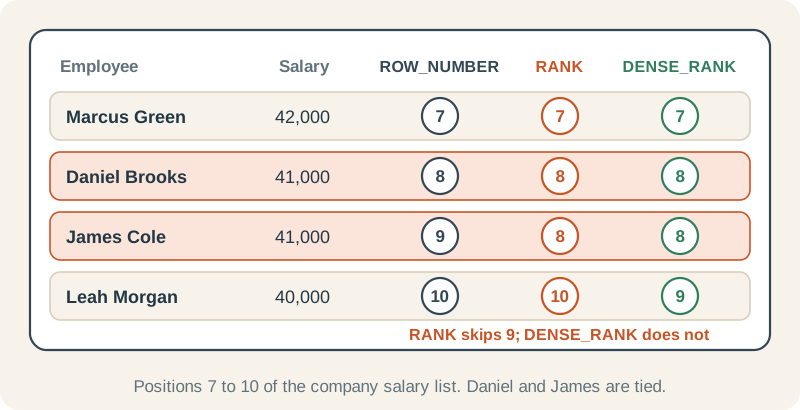
Three ways to number the same list
Daniel Brooks and James Cole both earn 41,000. ROW_NUMBER gives them 8 and 9 (Daniel first, because of the EmployeeID tiebreaker). RANK gives both 8 and skips 9. DENSE_RANK gives both 8 and carries on with 9.
SELECT FirstName, LastName, AnnualSalary,
       ROW_NUMBER() OVER (ORDER BY AnnualSalary DESC, EmployeeID) AS RowNum,
       RANK()       OVER (ORDER BY AnnualSalary DESC) AS RankNum,
       DENSE_RANK() OVER (ORDER BY AnnualSalary DESC) AS DenseRankNum
FROM dbo.Employees
ORDER BY AnnualSalary DESC, EmployeeID;| FirstName | LastName | AnnualSalary | RowNum | RankNum | DenseRankNum |
|---|---|---|---|---|---|
| Priya | Patel | 66000.00 | 1 | 1 | 1 |
| Oliver | Chen | 64000.00 | 2 | 2 | 2 |
| Amina | Khan | 62000.00 | 3 | 3 | 3 |
| Noah | Wright | 52000.00 | 4 | 4 | 4 |
| Eva | Turner | 50000.00 | 5 | 5 | 5 |
| Fatima | Ahmed | 43000.00 | 6 | 6 | 6 |
| Marcus | Green | 42000.00 | 7 | 7 | 7 |
| Daniel | Brooks | 41000.00 | 8 | 8 | 8 |
| James | Cole | 41000.00 | 9 | 8 | 8 |
| Leah | Morgan | 40000.00 | 10 | 10 | 9 |
| Grace | Lewis | 39000.00 | 11 | 11 | 10 |
| Sofia | Rivera | 37000.00 | 12 | 12 | 11 |
| Question | Use |
|---|---|
| Exactly one row per group (top earner, latest order) | ROW_NUMBER, with a tiebreaker |
| Leaderboard where ties share a place | RANK |
| “Second-highest salary”, counting equal salaries once | DENSE_RANK |
Running totals
A running total is SUM with an order: for each row, add up this row and every row before it. The frame ROWS BETWEEN UNBOUNDED PRECEDING AND CURRENT ROW says exactly that, from the first row up to this one.
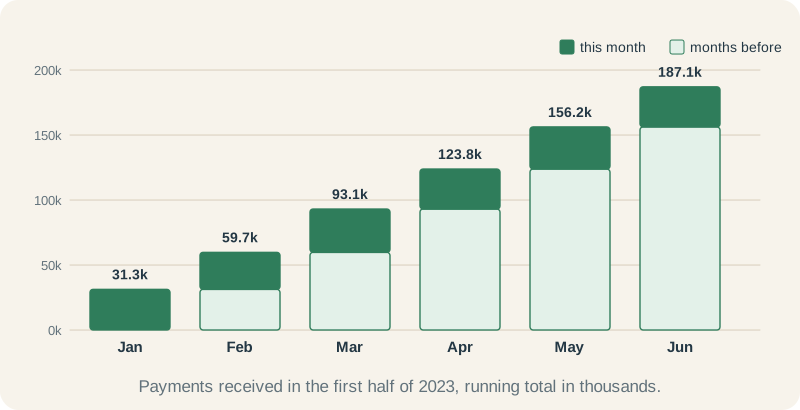
Payments received, month by month, with a running total
DATEFROMPARTS(YEAR(PaymentDate), MONTH(PaymentDate), 1) turns every date into the first day of its month, so the CTE can add up one total per month. The window then adds every month so far: January alone, then January plus February, and so on. The last row is the half-year total.
WITH Monthly AS (
    SELECT DATEFROMPARTS(YEAR(PaymentDate), MONTH(PaymentDate), 1) AS PaymentMonth,
           SUM(Amount) AS MonthAmount
    FROM dbo.Payments
    WHERE PaymentDate >= '2023-01-01'
      AND PaymentDate <  '2023-07-01'
    GROUP BY DATEFROMPARTS(YEAR(PaymentDate), MONTH(PaymentDate), 1)
)
SELECT PaymentMonth, MonthAmount,
       SUM(MonthAmount) OVER (ORDER BY PaymentMonth
                              ROWS BETWEEN UNBOUNDED PRECEDING AND CURRENT ROW) AS RunningTotal
FROM Monthly
ORDER BY PaymentMonth;| PaymentMonth | MonthAmount | RunningTotal |
|---|---|---|
| 2023-01-01 | 31270.50 | 31270.50 |
| 2023-02-01 | 28469.00 | 59739.50 |
| 2023-03-01 | 33331.50 | 93071.00 |
| 2023-04-01 | 30751.50 | 123822.50 |
| 2023-05-01 | 32384.00 | 156206.50 |
| 2023-06-01 | 30863.50 | 187070.00 |
Three mistakes to avoid
1. Filtering a window function in WHERE
Window functions are calculated after WHERE, GROUP BY and HAVING, so WHERE cannot see them. WHERE ROW_NUMBER() OVER (...) = 1 stops with error 4108:
Msg 4108, Level 15, State 1
Windowed functions can only appear in the SELECT or ORDER BY clauses.2. ROW_NUMBER on ties without a tiebreaker
ROW_NUMBER() OVER (ORDER BY AnnualSalary DESC) has to put Daniel and James in some order, and SQL Server is free to choose either. The same query can number them differently on another day or another server, so “keep number 9” is not a stable answer. Add a unique column, such as EmployeeID, to the end of the window’s ORDER BY.
3. Running totals over tied values
With ORDER BY but no frame, SQL Server uses RANGE BETWEEN UNBOUNDED PRECEDING AND CURRENT ROW. RANGE includes every row with the same ordering value as the current one, so tied rows all get the total for the whole tie.
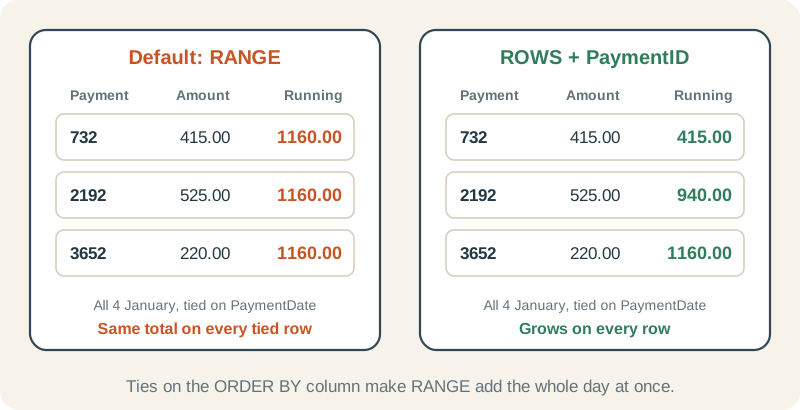
Wrong: one running total for several rows
Three payments arrived on 4 January, so all three show 1,160.00, the total for the whole day. Without a frame, SQL Server uses RANGE, which treats rows with the same PaymentDate as one step.
SELECT PaymentID, PaymentDate, Amount,
       SUM(Amount) OVER (ORDER BY PaymentDate) AS RunningTotal
FROM dbo.Payments
WHERE PaymentDate IN ('2023-01-04', '2023-01-05')
ORDER BY PaymentDate, PaymentID;| PaymentID | PaymentDate | Amount | RunningTotal |
|---|---|---|---|
| 732 | 2023-01-04 | 415.00 | 1160.00 |
| 2192 | 2023-01-04 | 525.00 | 1160.00 |
| 3652 | 2023-01-04 | 220.00 | 1160.00 |
| 3 | 2023-01-05 | 189.00 | 2318.00 |
| 1463 | 2023-01-05 | 433.00 | 2318.00 |
| 2923 | 2023-01-05 | 347.00 | 2318.00 |
| 4383 | 2023-01-05 | 189.00 | 2318.00 |
Right: a unique order and an explicit ROWS frame
PaymentID makes the order unique, and ROWS adds one row at a time, so the total grows on every line and ends at the same 2,318.00.
SELECT PaymentID, PaymentDate, Amount,
       SUM(Amount) OVER (ORDER BY PaymentDate, PaymentID
                         ROWS BETWEEN UNBOUNDED PRECEDING AND CURRENT ROW) AS RunningTotal
FROM dbo.Payments
WHERE PaymentDate IN ('2023-01-04', '2023-01-05')
ORDER BY PaymentDate, PaymentID;| PaymentID | PaymentDate | Amount | RunningTotal |
|---|---|---|---|
| 732 | 2023-01-04 | 415.00 | 415.00 |
| 2192 | 2023-01-04 | 525.00 | 940.00 |
| 3652 | 2023-01-04 | 220.00 | 1160.00 |
| 3 | 2023-01-05 | 189.00 | 1349.00 |
| 1463 | 2023-01-05 | 433.00 | 1782.00 |
| 2923 | 2023-01-05 | 347.00 | 2129.00 |
| 4383 | 2023-01-05 | 189.00 | 2318.00 |
Check yourself
Who has the second-highest salary in the company?
Reveal answer
WITH Ranked AS (
    SELECT FirstName, LastName, AnnualSalary,
           DENSE_RANK() OVER (ORDER BY AnnualSalary DESC) AS SalaryRank
    FROM dbo.Employees
)
SELECT FirstName, LastName, AnnualSalary
FROM Ranked
WHERE SalaryRank = 2;| FirstName | LastName | AnnualSalary |
|---|---|---|
| Oliver | Chen | 64000.00 |
Number by salary, highest first, and keep rank 2. Oliver Chen earns 64,000. DENSE_RANK is the safe choice for “second-highest salary”: if two people shared the top salary, RANK would have no rank 2 at all.
In the RANK column above there is no 9. Why, and which function would give 9 to Leah Morgan?
Reveal answer
RANK counts how many people are ahead of you and adds one. Nine people earn more than Leah, so she gets 10. DENSE_RANK counts distinct salaries instead, and gives her 9.
Number each customer’s orders from oldest to newest, then show customer 1’s first three orders.
Reveal answer
WITH Numbered AS (
    SELECT CustomerID, OrderID, OrderDate,
           ROW_NUMBER() OVER (PARTITION BY CustomerID
                              ORDER BY OrderDate, OrderID) AS OrderNumber
    FROM dbo.Orders
)
SELECT CustomerID, OrderID, OrderDate, OrderNumber
FROM Numbered
WHERE CustomerID = 1 AND OrderNumber <= 3
ORDER BY OrderNumber;| CustomerID | OrderID | OrderDate | OrderNumber |
|---|---|---|---|
| 1 | 1 | 2023-01-02 | 1 |
| 1 | 1461 | 2023-01-02 | 2 |
| 1 | 2921 | 2023-01-02 | 3 |
Partition by customer and order by date. All three orders were placed on the same day, 2 January 2023, so the OrderID tiebreaker is what decides 1, 2 and 3. Without it, the numbering of those three could change between runs.
Where to go next
Chapter 10 of the SQL Server roadmap covers each function in its own lesson, with practice:
- OVER and PARTITION BY
- ROW_NUMBER
- RANK and DENSE_RANK
- Running totals
- Moving aggregates and window frames: ROWS frames for moving averages
- Top-N results per group: the same pattern, applied to the top two products in each category