
Blog article
COUNT(*) vs COUNT(column) vs COUNT(DISTINCT): which one answers your question?
One table, three different counts. Learn what COUNT(*), COUNT(column) and COUNT(DISTINCT) really count, and avoid the three traps that silently break reports.
On this page12 sections
The same customer table can give three different counts: 20, 16 or 8. They answer different questions: customer rows, customers with an email, and distinct cities. If the question is how many customers there are, the answer is 20. Picking another count is one reason a report can quietly disagree with reality.
This guide explains COUNT(*), COUNT(column) and COUNT(DISTINCT column) with pictures, then shows the three traps that catch people in real queries. Every query runs on the DDI SQL Server practice dataset, and every result shown is what you will get.
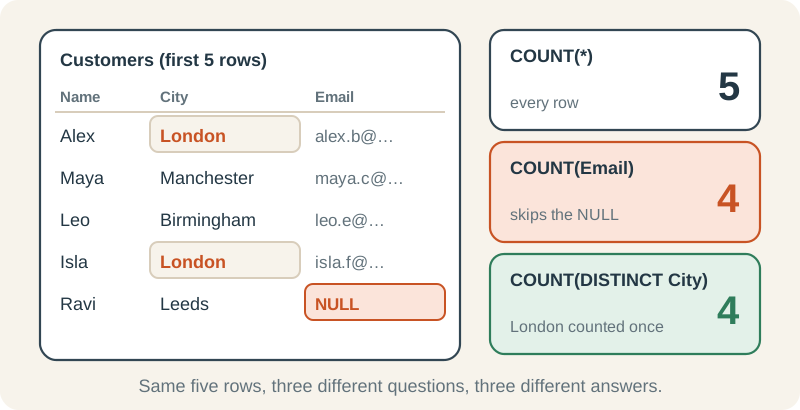
The three forms in one sentence each
| You write | It counts | NULLs |
|---|---|---|
| COUNT(*) | Rows | Counted: a row is a row |
| COUNT(column) | Rows where that column has a value | Skipped |
| COUNT(DISTINCT column) | Different values in that column | Skipped, never counted as a value |
COUNT(*): how many rows?
Count every customer row
* here does not mean “all columns”. It means “count the row itself”, whatever it contains.
SELECT COUNT(*) AS CustomerRows
FROM dbo.Customers;| CustomerRows |
|---|
| 20 |
COUNT(column): how many rows have a value?
Count non-NULL email values
Four customers have a NULL Email, so COUNT(Email) skips them. It does not check whether a non-NULL value is a usable email address: even an empty string would count.
SELECT COUNT(*)     AS CustomerRows,
       COUNT(Email) AS WithEmail
FROM dbo.Customers;| CustomerRows | WithEmail |
|---|---|
| 20 | 16 |
Depending on session settings and client, an aggregate may report “Null value is eliminated by an aggregate or other SET operation.” The warning is not guaranteed to appear; COUNT(Email) still skips NULL values. Check the result, not the presence of a warning.
Spot missing data with the difference
Subtracting the two counts shows how many values are missing. Here, 1,000 orders have no salesperson recorded.
SELECT COUNT(*)                          AS Orders,
       COUNT(SalesEmployeeID)            AS WithSalesperson,
       COUNT(*) - COUNT(SalesEmployeeID) AS MissingSalesperson
FROM dbo.Orders;| Orders | WithSalesperson | MissingSalesperson |
|---|---|---|
| 5000 | 4000 | 1000 |
COUNT(DISTINCT column): how many different values?
Count different cities, regions and salespeople
Duplicates collapse to one, so 20 customers live in 8 different cities across 4 regions. 4,000 orders were handled by 12 different salespeople; the NULLs are not counted as a 13th.
SELECT (SELECT COUNT(DISTINCT City)            FROM dbo.Customers) AS Cities,
       (SELECT COUNT(DISTINCT Region)          FROM dbo.Customers) AS Regions,
(SELECT COUNT(DISTINCT SalesEmployeeID) FROM dbo.Orders) AS Salespeople;| Cities | Regions | Salespeople |
|---|---|---|
| 8 | 4 | 12 |
All three in one report
The forms really shine together. One GROUP BY answers three questions per region at once:
Customers, emails and cities per region
Read the South row: 7 customers, 4 non-NULL Email values, and 2 distinct City values (London and Bristol). COUNT(Email) does not validate email text. For text columns, DISTINCT follows the column collation, so case or accent variants may compare as equal.
SELECT Region,
       COUNT(*)             AS Customers,
       COUNT(Email)         AS WithEmail,
       COUNT(DISTINCT City) AS Cities
FROM dbo.Customers
GROUP BY Region
ORDER BY Region;| Region | Customers | WithEmail | Cities |
|---|---|---|---|
| Midlands | 5 | 5 | 2 |
| North | 6 | 5 | 3 |
| South | 7 | 4 | 2 |
| West | 2 | 2 | 1 |
Trap 1: COUNT(*) after a LEFT JOIN
How many people report to each employee? A LEFT JOIN keeps employees with no reports, so this looks right:
SELECT m.EmployeeID, m.FirstName, COUNT(*) AS Reports
FROM dbo.Employees AS m
LEFT JOIN dbo.Employees AS r
    ON r.ManagerID = m.EmployeeID
GROUP BY m.EmployeeID, m.FirstName
ORDER BY m.EmployeeID;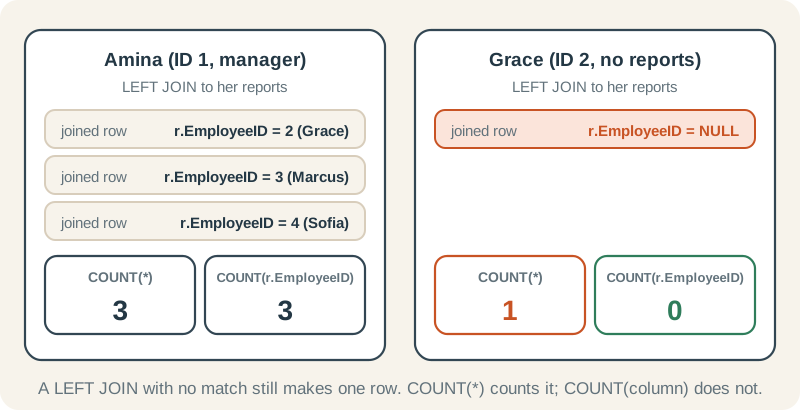
Why it happens. When a LEFT JOIN finds no match, it still returns the left row once, with NULL in every right-hand column. COUNT(*) counts rows, so that placeholder row counts as 1. Count a column from the right-hand table instead: it is NULL for the placeholder, so it is skipped.
The fix: count a right-hand column
Use a column that can never be NULL in a real match, such as the right table's primary key.
SELECT m.EmployeeID, m.FirstName, COUNT(r.EmployeeID) AS Reports
FROM dbo.Employees AS m
LEFT JOIN dbo.Employees AS r
    ON r.ManagerID = m.EmployeeID
GROUP BY m.EmployeeID, m.FirstName
ORDER BY m.EmployeeID;| EmployeeID | FirstName | Reports |
|---|---|---|
| 1 | Amina | 3 |
| 2 | Grace | 0 |
| 3 | Marcus | 0 |
| 4 | Sofia | 0 |
| 5 | Oliver | 4 |
| 6 | Daniel | 0 |
| 7 | Leah | 0 |
| 8 | Noah | 0 |
| 9 | Priya | 2 |
| 10 | Fatima | 0 |
| 11 | James | 0 |
| 12 | Eva | 0 |
Trap 2: COUNT with CASE ... ELSE 0
Counting rows that match a condition, without a WHERE, is a handy pattern. Add one innocent ELSE 0 and it breaks:
The mistake
1,250 orders are cancelled, but this counts all 5,000.
SELECT COUNT(CASE WHEN OrderStatus = N'Cancelled' THEN 1 ELSE 0 END) AS Cancelled
FROM dbo.Orders;| Cancelled |
|---|
| 5000 |
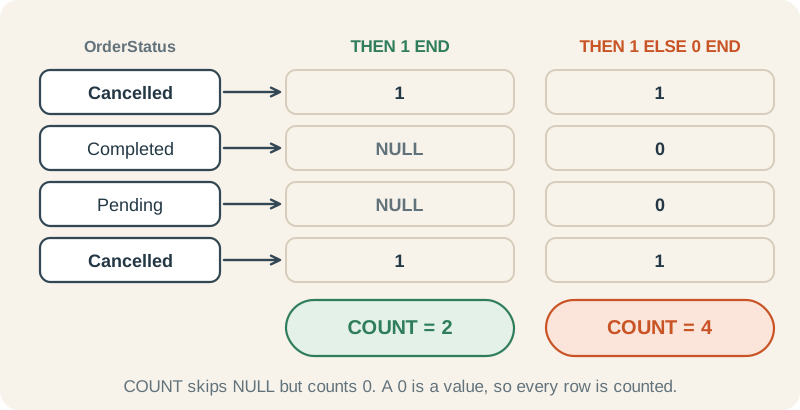
Two correct versions
For this non-empty Orders table, both expressions return 1,250. Without ELSE, CASE returns NULL for nonmatching rows and COUNT skips them; SUM adds 1 for a match and 0 otherwise. On an empty input, COUNT returns 0 but SUM returns NULL.
SELECT COUNT(CASE WHEN OrderStatus = N'Cancelled' THEN 1 END)        AS CountVersion,
       SUM(CASE WHEN OrderStatus = N'Cancelled' THEN 1 ELSE 0 END)   AS SumVersion
FROM dbo.Orders;| CountVersion | SumVersion |
|---|---|
| 1250 | 1250 |
Trap 3: counting after a join
Every order has two order lines. Join them, and COUNT(*) counts lines, not orders:
Rows versus orders
The join creates one row per order line. COUNT(DISTINCT o.OrderID) counts each order once, however many lines it has.
SELECT COUNT(*)                  AS JoinedRows,
       COUNT(DISTINCT o.OrderID) AS Orders
FROM dbo.Orders AS o
JOIN dbo.OrderItems AS oi
ON oi.OrderID = o.OrderID;| JoinedRows | Orders |
|---|---|
| 10000 | 5000 |
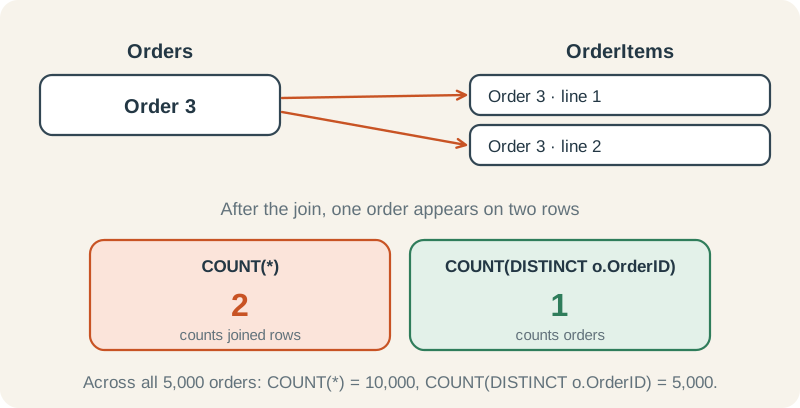
Two SQL Server details worth knowing
- No COUNT(DISTINCT a, b). SQL Server allows only one expression inside
COUNT(DISTINCT ...). To count distinct pairs, count the rows of aSELECT DISTINCT:SELECT COUNT(*) FROM (SELECT DISTINCT City, Region FROM dbo.Customers) AS pairs;returns 8. - COUNT returns int. That tops out at about 2.1 billion. On truly huge tables use
COUNT_BIG(*), which returns bigint.
Cheat sheet
| Question | Use | Practice-data answer |
|---|---|---|
| How many rows? | COUNT(*) | 20 customers |
| How many have a value? | COUNT(Email) | 16 with an email |
| How many are missing? | COUNT(*) - COUNT(col) | 1,000 orders without a salesperson |
| How many different values? | COUNT(DISTINCT City) | 8 cities |
| How many matches per row in a LEFT JOIN? | COUNT(right_table.key) | 0 for employees with no reports |
| How many rows meet a condition? | COUNT(CASE WHEN ... THEN 1 END) | 1,250 cancelled orders |
| How many parents after joining children? | COUNT(DISTINCT parent.key) | 5,000 orders, not 10,000 lines |
Try it yourself
How many different order statuses are there in dbo.Orders?
Reveal answer
SELECT COUNT(DISTINCT OrderStatus) AS Statuses
FROM dbo.Orders;| Statuses |
|---|
| 4 |
Use COUNT(DISTINCT OrderStatus). The answer is 4: Cancelled, Completed, Pending and Shipped.
Without a WHERE clause, count the orders placed InStore in one query.
Reveal answer
SELECT COUNT(CASE WHEN OrderChannel = N'InStore' THEN 1 END) AS InStoreOrders
FROM dbo.Orders;| InStoreOrders |
|---|
| 1666 |
Use a CASE with no ELSE inside COUNT. 1,666 of the 5,000 orders were placed in store.
Why does COUNT(*) - COUNT(Email) on dbo.Customers return 4?
Reveal answer
COUNT(*) counts all 20 rows and COUNT(Email) counts the 16 with a value, so the difference is the number of missing emails: 4.
Where to go next
Each idea has a full lesson in the SQL Server roadmap:
- COUNT, SUM, AVG, MIN, and MAX: the aggregate basics
- Conditional aggregation: COUNT and SUM with CASE (trap 2)
- LEFT and RIGHT OUTER JOIN: placeholder rows (trap 1)
- Diagnosing duplicate or missing rows after joins: row multiplication (trap 3)
- IS NULL and missing values: what NULL means