
Blog article
SQL JOINs explained: INNER, LEFT, RIGHT and FULL, with one picture each
Every join answers one question: what happens to rows with no match? INNER, LEFT, RIGHT and FULL OUTER JOIN, one picture each, with exact results you can run on the SQL Server practice dataset.
On this page12 sections
You join dbo.Orders to dbo.Employees to show who took each order. The orders table has 5,000 rows. Your report shows 4,000. There is no error and no warning: a thousand orders simply are not there.
Nothing is broken. You asked for an INNER JOIN, and an INNER JOIN only returns rows that have a partner on both sides. Every join type is really the answer to one question: what should happen to rows that have no match? This guide answers it four times, with one picture for each join.
The report that loses 1,000 orders
Both numbers come from the same 5,000 orders. The INNER JOIN silently drops every order with no SalesEmployeeID.
SELECT
    (SELECT COUNT(*) FROM dbo.Orders) AS AllOrders,
    (SELECT COUNT(*)
     FROM dbo.Orders AS o
     INNER JOIN dbo.Employees AS e
ON e.EmployeeID = o.SalesEmployeeID) AS OrdersAfterInnerJoin;| AllOrders | OrdersAfterInnerJoin |
|---|---|
| 5000 | 4000 |
Two small lists to join
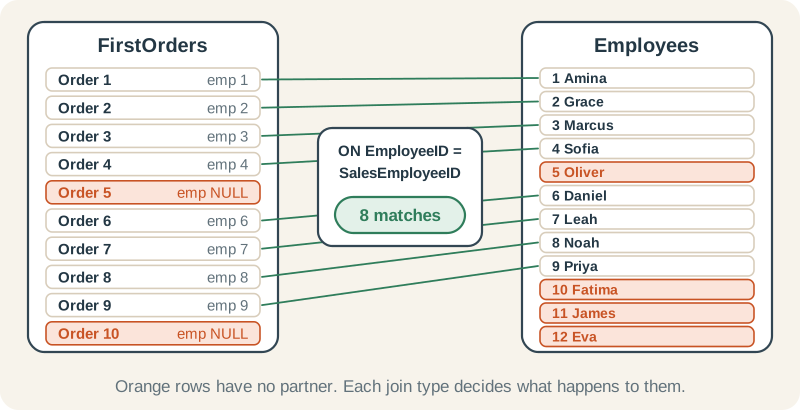
Five thousand rows are too many to see, so the four join-type comparisons use the first ten orders, which we call FirstOrders, and the twelve employees. The join condition is the same each time: the order’s SalesEmployeeID must equal the employee’s EmployeeID.
Look at the ten orders first
Always look at both sides before joining. Orders 5 and 10 have no SalesEmployeeID: nobody was recorded as taking them.
SELECT OrderID, SalesEmployeeID
FROM dbo.Orders
WHERE OrderID <= 10
ORDER BY OrderID;| OrderID | SalesEmployeeID |
|---|---|
| 1 | 1 |
| 2 | 2 |
| 3 | 3 |
| 4 | 4 |
| 5 | NULL |
| 6 | 6 |
| 7 | 7 |
| 8 | 8 |
| 9 | 9 |
| 10 | NULL |
The queries below wrap those ten orders in a common table expression (the WITH FirstOrders AS (...) part) so that each one runs on its own. You can read it as “for this query, FirstOrders means these ten rows”.
| Join | Unmatched left rows | Unmatched right rows | Rows here |
|---|---|---|---|
| INNER JOIN | Dropped | Dropped | 8 |
| LEFT JOIN | Kept, with NULLs | Dropped | 10 |
| RIGHT JOIN | Dropped | Kept, with NULLs | 12 |
| FULL OUTER JOIN | Kept, with NULLs | Kept, with NULLs | 14 |
INNER JOIN: only the pairs
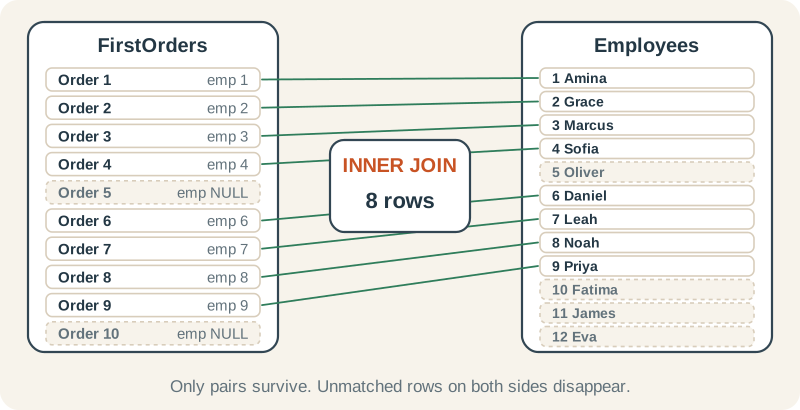
An INNER JOIN returns one row for every pair of rows that satisfies the ON condition. A row with no partner produces nothing, on either side. Writing just JOIN means the same thing.
INNER JOIN: 8 rows
Orders 5 and 10 are gone, and so are the four employees who took none of these orders.
WITH FirstOrders AS (
    SELECT OrderID, SalesEmployeeID
    FROM dbo.Orders
    WHERE OrderID <= 10
)
SELECT o.OrderID, o.SalesEmployeeID, e.EmployeeID, e.FirstName
FROM FirstOrders AS o
INNER JOIN dbo.Employees AS e
    ON e.EmployeeID = o.SalesEmployeeID
ORDER BY o.OrderID;| OrderID | SalesEmployeeID | EmployeeID | FirstName |
|---|---|---|---|
| 1 | 1 | 1 | Amina |
| 2 | 2 | 2 | Grace |
| 3 | 3 | 3 | Marcus |
| 4 | 4 | 4 | Sofia |
| 6 | 6 | 6 | Daniel |
| 7 | 7 | 7 | Leah |
| 8 | 8 | 8 | Noah |
| 9 | 9 | 9 | Priya |
Use it when a row without a partner is meaningless for the question, such as “sales per employee”, where an order nobody took cannot be credited to anyone.
LEFT JOIN: keep everything on the left
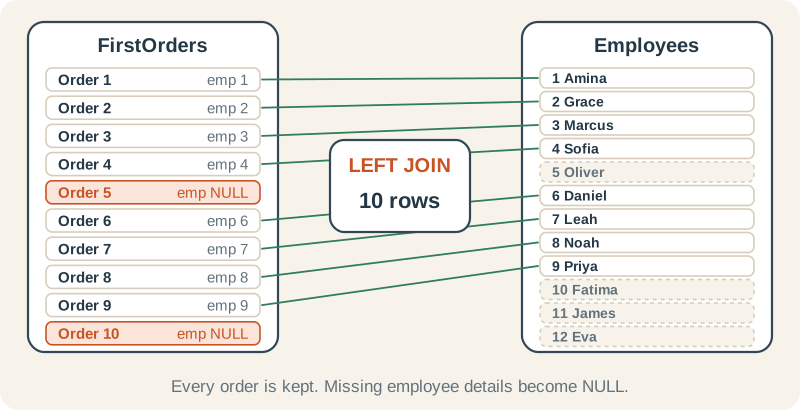
A LEFT JOIN returns every row from the left table. Where a partner exists, its columns are filled in; where none exists, they are NULL. This is the join to use when the left table is the list you must not lose, such as “all orders, with the employee if there is one”.
LEFT JOIN: 10 rows
Every order is back. Orders 5 and 10 have NULL in every employee column, because there was nothing to match.
WITH FirstOrders AS (
    SELECT OrderID, SalesEmployeeID
    FROM dbo.Orders
    WHERE OrderID <= 10
)
SELECT o.OrderID, o.SalesEmployeeID, e.EmployeeID, e.FirstName
FROM FirstOrders AS o
LEFT JOIN dbo.Employees AS e
    ON e.EmployeeID = o.SalesEmployeeID
ORDER BY o.OrderID;| OrderID | SalesEmployeeID | EmployeeID | FirstName |
|---|---|---|---|
| 1 | 1 | 1 | Amina |
| 2 | 2 | 2 | Grace |
| 3 | 3 | 3 | Marcus |
| 4 | 4 | 4 | Sofia |
| 5 | NULL | NULL | NULL |
| 6 | 6 | 6 | Daniel |
| 7 | 7 | 7 | Leah |
| 8 | 8 | 8 | Noah |
| 9 | 9 | 9 | Priya |
| 10 | NULL | NULL | NULL |
This is the fix for the report at the top of the page: switch the INNER JOIN on the full table to a LEFT JOIN, and no order is lost.
Back to the report: LEFT JOIN keeps all 5,000
Same join, different keyword. The 1,000 orders with no salesperson are back, with NULL employee columns, and the report count matches the orders table again.
SELECT COUNT(*) AS OrdersAfterLeftJoin
FROM dbo.Orders AS o
LEFT JOIN dbo.Employees AS e
ON e.EmployeeID = o.SalesEmployeeID;| OrdersAfterLeftJoin |
|---|
| 5000 |
RIGHT JOIN: keep everything on the right
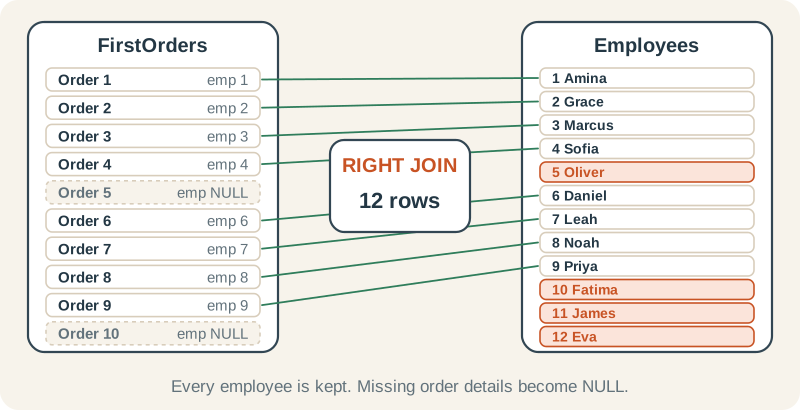
A RIGHT JOIN is the mirror image: every row from the right table is kept. Here that answers “all employees, with any of these orders they took”.
RIGHT JOIN: 12 rows
Every employee appears once here because each one matched at most one of these ten orders. SQL Server sorts NULL first, so the four employees without an order come at the top.
WITH FirstOrders AS (
    SELECT OrderID, SalesEmployeeID
    FROM dbo.Orders
    WHERE OrderID <= 10
)
SELECT o.OrderID, o.SalesEmployeeID, e.EmployeeID, e.FirstName
FROM FirstOrders AS o
RIGHT JOIN dbo.Employees AS e
    ON e.EmployeeID = o.SalesEmployeeID
ORDER BY o.OrderID, e.EmployeeID;| OrderID | SalesEmployeeID | EmployeeID | FirstName |
|---|---|---|---|
| NULL | NULL | 5 | Oliver |
| NULL | NULL | 10 | Fatima |
| NULL | NULL | 11 | James |
| NULL | NULL | 12 | Eva |
| 1 | 1 | 1 | Amina |
| 2 | 2 | 2 | Grace |
| 3 | 3 | 3 | Marcus |
| 4 | 4 | 4 | Sofia |
| 6 | 6 | 6 | Daniel |
| 7 | 7 | 7 | Leah |
| 8 | 8 | 8 | Noah |
| 9 | 9 | 9 | Priya |
The same 12 rows written as a LEFT JOIN
Put Employees first and the RIGHT JOIN becomes a LEFT JOIN. Many teams write only LEFT JOIN, so the table you must keep is always the first one you read.
WITH FirstOrders AS (
    SELECT OrderID, SalesEmployeeID
    FROM dbo.Orders
    WHERE OrderID <= 10
)
SELECT o.OrderID, o.SalesEmployeeID, e.EmployeeID, e.FirstName
FROM dbo.Employees AS e
LEFT JOIN FirstOrders AS o
    ON o.SalesEmployeeID = e.EmployeeID
ORDER BY o.OrderID, e.EmployeeID;| OrderID | SalesEmployeeID | EmployeeID | FirstName |
|---|---|---|---|
| NULL | NULL | 5 | Oliver |
| NULL | NULL | 10 | Fatima |
| NULL | NULL | 11 | James |
| NULL | NULL | 12 | Eva |
| 1 | 1 | 1 | Amina |
| 2 | 2 | 2 | Grace |
| 3 | 3 | 3 | Marcus |
| 4 | 4 | 4 | Sofia |
| 6 | 6 | 6 | Daniel |
| 7 | 7 | 7 | Leah |
| 8 | 8 | 8 | Noah |
| 9 | 9 | 9 | Priya |
FULL OUTER JOIN: keep everything
A FULL OUTER JOIN keeps unmatched rows from both sides. It is the join for reconciling two lists, because the gaps on each side are exactly what you are looking for: orders nobody took, and employees who took none of them.
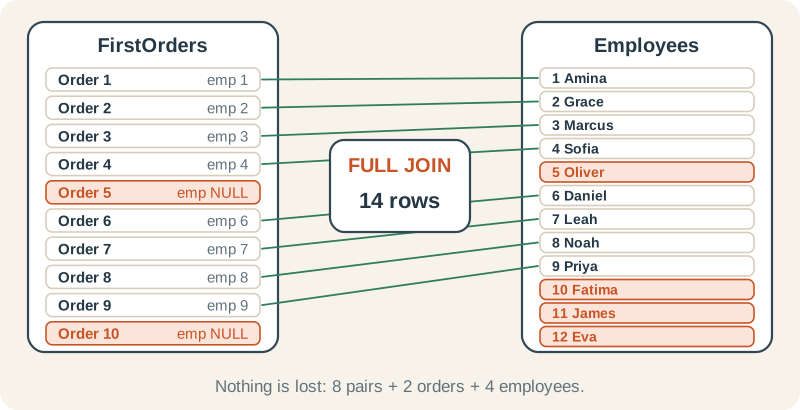
FULL OUTER JOIN: 14 rows
The four employees with no order sort first (their OrderID is NULL), then all ten orders. Orders 5 and 10 have NULL employee columns.
WITH FirstOrders AS (
    SELECT OrderID, SalesEmployeeID
    FROM dbo.Orders
    WHERE OrderID <= 10
)
SELECT o.OrderID, o.SalesEmployeeID, e.EmployeeID, e.FirstName
FROM FirstOrders AS o
FULL OUTER JOIN dbo.Employees AS e
    ON e.EmployeeID = o.SalesEmployeeID
ORDER BY o.OrderID, e.EmployeeID;| OrderID | SalesEmployeeID | EmployeeID | FirstName |
|---|---|---|---|
| NULL | NULL | 5 | Oliver |
| NULL | NULL | 10 | Fatima |
| NULL | NULL | 11 | James |
| NULL | NULL | 12 | Eva |
| 1 | 1 | 1 | Amina |
| 2 | 2 | 2 | Grace |
| 3 | 3 | 3 | Marcus |
| 4 | 4 | 4 | Sofia |
| 5 | NULL | NULL | NULL |
| 6 | 6 | 6 | Daniel |
| 7 | 7 | 7 | Leah |
| 8 | 8 | 8 | Noah |
| 9 | 9 | 9 | Priya |
| 10 | NULL | NULL | NULL |
Find the rows that did not match
The most useful outer join pattern is not about the matches at all. Keep every row with a LEFT JOIN, then keep only the rows where the right side came back empty. Test the right table’s key, because a key column is never NULL in a real match.
Which orders were never paid?
Keep every order, then keep only the rows where the payment side found nothing. 2,500 orders have no payment, and the status breakdown shows why: cancelled and pending orders are not paid.
SELECT o.OrderStatus, COUNT(*) AS UnpaidOrders
FROM dbo.Orders AS o
LEFT JOIN dbo.Payments AS p
    ON p.OrderID = o.OrderID
WHERE p.PaymentID IS NULL
GROUP BY o.OrderStatus
ORDER BY o.OrderStatus;| OrderStatus | UnpaidOrders |
|---|---|
| Cancelled | 1250 |
| Pending | 1250 |
Three mistakes to avoid
1. Filtering the right table in WHERE
Say you want all ten orders, and the employee’s name only when that employee works in Sales (DepartmentID 1). WHERE runs after the join. If it tests a column from the optional table, the NULL rows the LEFT JOIN kept fail the test and disappear, so you get INNER JOIN results while the query still says LEFT JOIN.
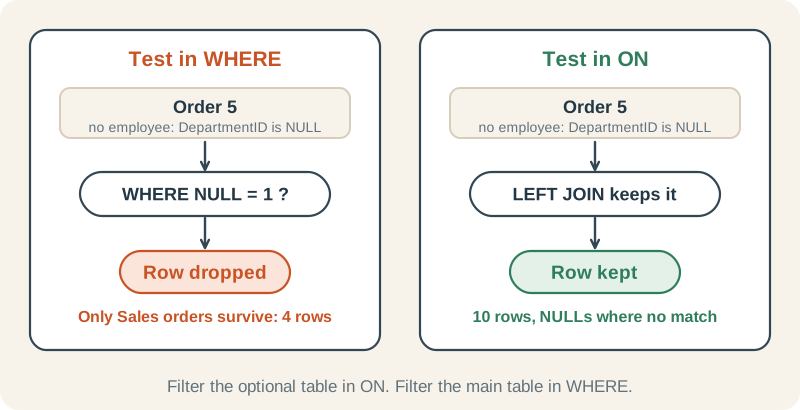
Wrong: the LEFT JOIN quietly becomes an INNER JOIN
Only orders taken by the Sales department (DepartmentID 1) survive. Orders 5 and 10 had NULL in e.DepartmentID, so the WHERE test was not true and they were removed, together with every other department.
WITH FirstOrders AS (
    SELECT OrderID, SalesEmployeeID
    FROM dbo.Orders
    WHERE OrderID <= 10
)
SELECT o.OrderID, o.SalesEmployeeID, e.EmployeeID, e.FirstName
FROM FirstOrders AS o
LEFT JOIN dbo.Employees AS e
    ON e.EmployeeID = o.SalesEmployeeID
WHERE e.DepartmentID = 1
ORDER BY o.OrderID;| OrderID | SalesEmployeeID | EmployeeID | FirstName |
|---|---|---|---|
| 1 | 1 | 1 | Amina |
| 2 | 2 | 2 | Grace |
| 3 | 3 | 3 | Marcus |
| 4 | 4 | 4 | Sofia |
Right: put the condition in ON
All ten orders stay. The employee details are filled in only when the employee is in Sales; every other order keeps NULLs.
WITH FirstOrders AS (
    SELECT OrderID, SalesEmployeeID
    FROM dbo.Orders
    WHERE OrderID <= 10
)
SELECT o.OrderID, o.SalesEmployeeID, e.EmployeeID, e.FirstName
FROM FirstOrders AS o
LEFT JOIN dbo.Employees AS e
    ON e.EmployeeID = o.SalesEmployeeID
   AND e.DepartmentID = 1
ORDER BY o.OrderID;| OrderID | SalesEmployeeID | EmployeeID | FirstName |
|---|---|---|---|
| 1 | 1 | 1 | Amina |
| 2 | 2 | 2 | Grace |
| 3 | 3 | 3 | Marcus |
| 4 | 4 | 4 | Sofia |
| 5 | NULL | NULL | NULL |
| 6 | 6 | NULL | NULL |
| 7 | 7 | NULL | NULL |
| 8 | 8 | NULL | NULL |
| 9 | 9 | NULL | NULL |
| 10 | NULL | NULL | NULL |
If you really do want only the orders taken by Sales, the WHERE version returns the right rows, but write it as an INNER JOIN so the query says what it does.
2. Expecting NULL keys to match
A NULL key never matches anything, not even another NULL, because NULL = NULL is unknown rather than true. Orders 5 and 10 found no partner above because no employee has a missing ID, but even a row with a NULL key on the other side would not have paired with them. If missing keys should match a default, decide that explicitly, for example with an “Unassigned” row, rather than hoping the join does it.
3. Joining to a table with many rows per key
Joins do not only drop rows; they can also multiply them. When each left row has several partners, you get one output row per partner.
Joining to a “many” table multiplies rows
Every order has two lines in dbo.OrderItems, so the join returns two rows per order. Anything you count or add up per order is now doubled unless you group or count distinct values.
SELECT COUNT(*) AS JoinedRows,
       COUNT(DISTINCT o.OrderID) AS Orders
FROM dbo.Orders AS o
INNER JOIN dbo.OrderItems AS oi
ON oi.OrderID = o.OrderID;| JoinedRows | Orders |
|---|---|
| 10000 | 5000 |
If you then add up an order-level amount, the total doubles. Diagnosing duplicate or missing rows after joins shows how to catch this, and 5 SQL mistakes that silently return wrong answers walks through a doubled total.
Check yourself
How many rows does dbo.Orders INNER JOIN dbo.Payments return, and why?
Reveal answer
SELECT COUNT(*) AS PaidOrders
FROM dbo.Orders AS o
INNER JOIN dbo.Payments AS p
ON p.OrderID = o.OrderID;| PaidOrders |
|---|
| 2500 |
Payments exist only for completed and shipped orders, one per order, so the INNER JOIN returns 2,500 rows. A LEFT JOIN from Orders would return all 5,000.
Imagine a second list of staff in which one row has a NULL ID. You FULL OUTER JOIN FirstOrders to it. Does order 5, whose SalesEmployeeID is NULL, pair with that row?
Reveal answer
No. NULL = NULL is unknown, not true, so the ON condition fails. Order 5 appears on its own row with NULL staff columns, and the staff row with the NULL ID appears on its own row with NULL order columns.
Rewrite this as a LEFT JOIN: FROM dbo.Payments AS p RIGHT JOIN dbo.Orders AS o ON o.OrderID = p.OrderID
Reveal answer
SELECT COUNT(*) AS OrderRows
FROM dbo.Orders AS o
LEFT JOIN dbo.Payments AS p
ON p.OrderID = o.OrderID;| OrderRows |
|---|
| 5000 |
Swap the tables and change the keyword. Both versions keep all 5,000 orders.
Where to go next
Each join has a full lesson, with more practice, in Chapter 6 of the SQL Server roadmap:
- Join keys and relationship cardinality: why some joins multiply rows
- INNER JOIN
- LEFT and RIGHT OUTER JOIN
- FULL OUTER JOIN and CROSS JOIN
- Self joins: join Employees to itself to find each manager
- Diagnosing duplicate or missing rows after joins