
Blog article
WHERE vs HAVING: the one rule, and the mistake that hides rows
WHERE filters rows before grouping, HAVING filters groups after. One rule, a diagram of the clause order, and the common mistake that makes cities with zero matches vanish from a report.
On this page11 sections
Your manager asks a simple question: which cities have fewer than 300 completed orders? They want to know where to focus next quarter. You write a query, it runs first time, and it returns three cities.
Four cities are missing, and they are exactly the ones with the biggest problem. The query has no error in it. It filters in WHERE a condition that needed to be counted inside each group and tested in HAVING, and that one choice decides which cities are even allowed into the answer.
“Which cities have fewer than 300 completed orders?”
The query runs, the numbers are correct, and the answer looks reasonable: three cities. It is also incomplete, and the cities it leaves out are the ones that most need attention.
SELECT c.City, COUNT(*) AS CompletedOrders
FROM dbo.Customers AS c
INNER JOIN dbo.Orders AS o
    ON o.CustomerID = c.CustomerID
WHERE o.OrderStatus = N'Completed'
GROUP BY c.City
HAVING COUNT(*) < 300
ORDER BY c.City;| City | CompletedOrders |
|---|---|
| Cardiff | 250 |
| Leeds | 250 |
| York | 250 |
We will come back to this query once the rule is clear. Spoiler: Birmingham, Bristol, Leicester and Manchester have zero completed orders, and the query above cannot see them.
The one rule
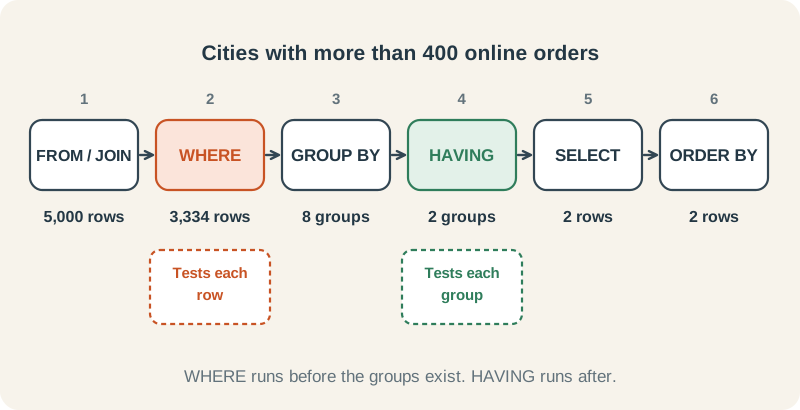
WHERE filters rows before they are grouped. HAVING filters groups after they are made.
Everything else follows from that. A condition that is true or false for a single row, such as “this order is online”, belongs in WHERE. A condition that is only known once rows are added up, such as “this city has more than 400 orders”, belongs in HAVING, because before grouping there is no city total to test.
WHERE: decide which rows count
WHERE looks at one row at a time and keeps the row only when the test is true. It runs before any grouping, so the rows it removes are never counted, summed or averaged.
WHERE: completed orders per channel
WHERE keeps only completed orders, then GROUP BY counts what is left. The other 3,750 orders never reach the count.
SELECT OrderChannel, COUNT(*) AS CompletedOrders
FROM dbo.Orders
WHERE OrderStatus = N'Completed'
GROUP BY OrderChannel
ORDER BY OrderChannel;| OrderChannel | CompletedOrders |
|---|---|
| InStore | 416 |
| Online | 834 |
HAVING: decide which groups to show
HAVING looks at one group at a time. Its test usually contains an aggregate, such as COUNT(*) or SUM(Amount), because that is what a group has that a single row does not.
HAVING: cities with more than two customers
GROUP BY makes one row per city first. Only then can HAVING ask a question about the whole group, such as how many customers it contains.
SELECT City, COUNT(*) AS Customers
FROM dbo.Customers
GROUP BY City
HAVING COUNT(*) > 2
ORDER BY City;| City | Customers |
|---|---|
| Birmingham | 3 |
| London | 5 |
Using both in one query
Most real questions need both: a row filter to choose what to count, and a group filter to choose what to report.
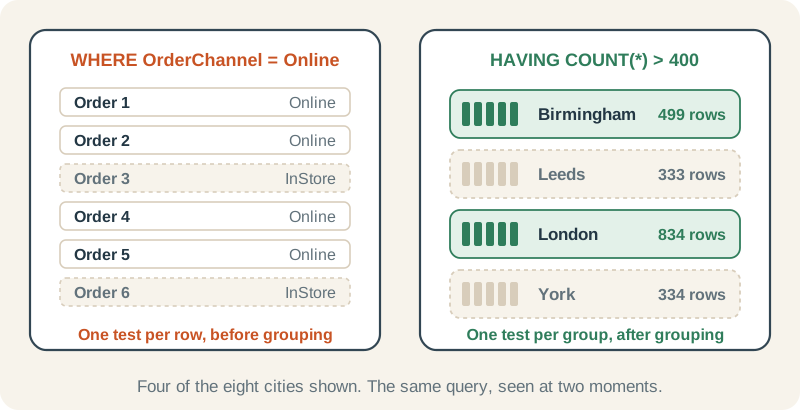
Both: cities with more than 400 online orders
WHERE removes the 1,666 in-store orders, GROUP BY turns the remaining 3,334 rows into 8 city groups, and HAVING keeps the 2 groups with more than 400 rows.
SELECT c.City, COUNT(*) AS OnlineOrders
FROM dbo.Customers AS c
INNER JOIN dbo.Orders AS o
    ON o.CustomerID = c.CustomerID
WHERE o.OrderChannel = N'Online'
GROUP BY c.City
HAVING COUNT(*) > 400
ORDER BY c.City;| City | OnlineOrders |
|---|---|
| Birmingham | 499 |
| London | 834 |
The mistake that hides rows
Back to the opening query. It filters completed orders in WHERE, then counts them per city. For a city like Bristol, whose 500 orders are all cancelled or pending, WHERE removes every row. No rows means no Bristol group, and a group that does not exist cannot be tested by HAVING, so it cannot appear in the answer, even though 0 is certainly fewer than 300.
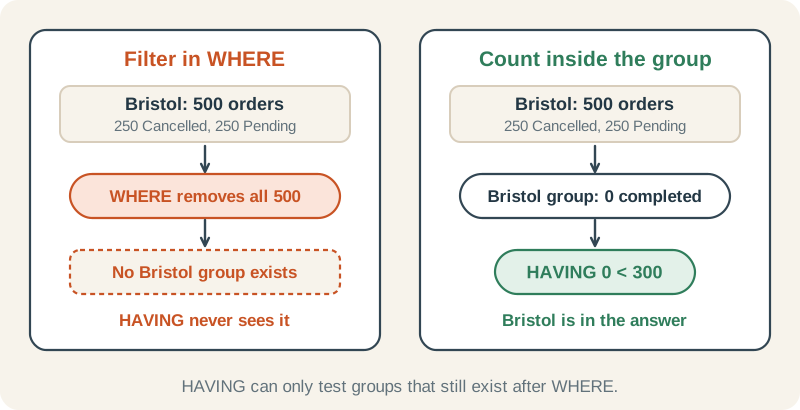
What the WHERE clause hid
Count completed orders inside each city instead of filtering them first, and the four missing cities appear with a count of 0.
SELECT c.City,
       COUNT(*) AS AllOrders,
       COUNT(CASE WHEN o.OrderStatus = N'Completed' THEN 1 END) AS CompletedOrders
FROM dbo.Customers AS c
INNER JOIN dbo.Orders AS o
    ON o.CustomerID = c.CustomerID
GROUP BY c.City
ORDER BY c.City;| City | AllOrders | CompletedOrders |
|---|---|---|
| Birmingham | 750 | 0 |
| Bristol | 500 | 0 |
| Cardiff | 500 | 250 |
| Leeds | 500 | 250 |
| Leicester | 500 | 0 |
| London | 1250 | 500 |
| Manchester | 500 | 0 |
| York | 500 | 250 |
The fix is to stop filtering the rows and count conditionally instead. Every city reaches GROUP BY, and the HAVING test runs on the real count, including zeros.
Right: move the condition into the count
Every city now reaches HAVING, and seven have fewer than 300 completed orders. The CASE has no ELSE, so other statuses become NULL, and COUNT skips NULLs.
SELECT c.City,
       COUNT(CASE WHEN o.OrderStatus = N'Completed' THEN 1 END) AS CompletedOrders
FROM dbo.Customers AS c
INNER JOIN dbo.Orders AS o
    ON o.CustomerID = c.CustomerID
GROUP BY c.City
HAVING COUNT(CASE WHEN o.OrderStatus = N'Completed' THEN 1 END) < 300
ORDER BY c.City;| City | CompletedOrders |
|---|---|
| Birmingham | 0 |
| Bristol | 0 |
| Cardiff | 250 |
| Leeds | 250 |
| Leicester | 0 |
| Manchester | 0 |
| York | 250 |
Three more mistakes
1. Putting an aggregate in WHERE
WHERE COUNT(*) > 400 fails before it runs, because WHERE works on single rows and there is no count yet. SQL Server stops with error 147:
Msg 147, Level 15, State 1
An aggregate may not appear in the WHERE clause unless it is in a subquery contained in a HAVING clause or a select list, and the column being aggregated is an outer reference.2. Using a SELECT alias in HAVING
HAVING CompletedOrders < 300 looks natural, but HAVING runs before SELECT, so the alias does not exist yet and SQL Server reports Invalid column name 'CompletedOrders' (error 207). Repeat the expression in HAVING, as the fixed query above does. ORDER BY is the one clause that can use the alias, because it runs last.
3. Putting row conditions in HAVING
HAVING can test a column that is in the GROUP BY, so this works:
Works, but put it in WHERE
This returns the same two rows as WHERE City IN (N'Leeds', N'York') placed before the GROUP BY, because City is a grouped column. But it reads as if every city were grouped first and most of them then thrown away, so keep row conditions in WHERE, where the next reader expects them.
SELECT City, COUNT(*) AS Customers
FROM dbo.Customers
GROUP BY City
HAVING City IN (N'Leeds', N'York')
ORDER BY City;| City | Customers |
|---|---|
| Leeds | 2 |
| York | 2 |
A column that is not grouped cannot be tested in HAVING at all: SQL Server reports that it “is invalid in the HAVING clause because it is not contained in either an aggregate function or the GROUP BY clause” (error 8121). Row conditions belong in WHERE.
| Your condition | Clause | Example |
|---|---|---|
| Is true or false for each row | WHERE | o.OrderChannel = N'Online' |
| Is about a total, count or average | HAVING | COUNT(*) > 400 |
| Must keep groups with zero matches | HAVING with conditional aggregate | COUNT(CASE WHEN … THEN 1 END) < 300 |
Check yourself
Which products sold more than 1,668 units in total? (Units come from dbo.OrderItems.Quantity.)
Reveal answer
SELECT p.ProductName, SUM(oi.Quantity) AS Units
FROM dbo.OrderItems AS oi
INNER JOIN dbo.Products AS p
    ON p.ProductID = oi.ProductID
GROUP BY p.ProductName
HAVING SUM(oi.Quantity) > 1668
ORDER BY Units DESC, p.ProductName;| ProductName | Units |
|---|---|
| Desk Lamp | 1671 |
| Wireless Mouse | 1671 |
| USB-C Dock | 1670 |
| Webcam | 1669 |
The condition is about a total, so it goes in HAVING. Four products qualify.
WHERE or HAVING? (a) only orders placed in 2024, (b) only customers with more than 200 orders, (c) only London customers.
Reveal answer
(a) WHERE: it is true or false for each order row. (b) HAVING: “more than 200 orders” is only known after the orders are counted per customer. (c) WHERE: City is a property of each row, so filter it before grouping.
In 2024 alone, which cities placed more than 300 orders?
Reveal answer
SELECT c.City, COUNT(*) AS Orders2024
FROM dbo.Customers AS c
INNER JOIN dbo.Orders AS o
    ON o.CustomerID = c.CustomerID
WHERE o.OrderDate >= '2024-01-01'
  AND o.OrderDate <  '2025-01-01'
GROUP BY c.City
HAVING COUNT(*) > 300
ORDER BY c.City;| City | Orders2024 |
|---|---|
| Birmingham | 368 |
| London | 606 |
Use WHERE for the year, because each order either is or is not in 2024, and HAVING for the count, because it belongs to the city group. Birmingham and London qualify.
Where to go next
These lessons in Chapter 5 of the SQL Server roadmap go further, with practice for each idea:
- GROUP BY: how rows become groups
- HAVING: filtering groups
- Conditional aggregation: COUNT and SUM with CASE, the fix used above
- Avoiding misleading aggregate results
- COUNT(*) vs COUNT(column) vs COUNT(DISTINCT): why
CASE … ELSE 0breaks a count