
Relational foundations
Tables, rows, columns, and data values
Read a SQL Server table accurately, including column types and NULL values.
Lesson 2 of 84
Reading: about 2 min
Lesson + practice: about 12 min
Difficulty: Beginner
On this page3 sections
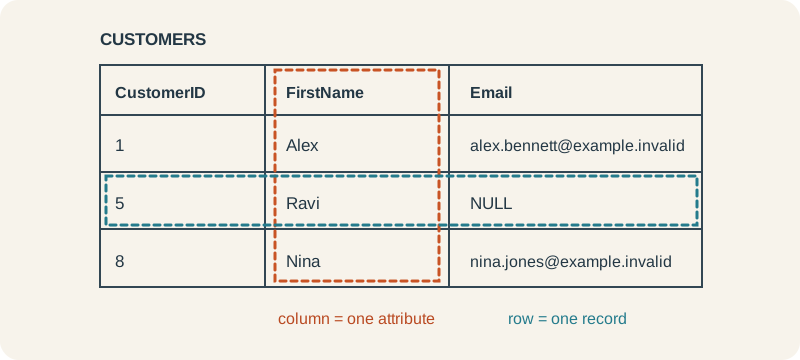
A table has a defined set of columns. Each column has a name and SQL Server data type. Every row represents one record, and every column represents one attribute of that record. A cell may contain a value or NULL. This lesson uses DDI_SQL_Training dataset v1.0.0 on SQL Server 2019 or later.
Read a real table
The Customers table has CustomerID, FirstName, LastName, City, Region, and Email. CustomerID is an integer. Names and locations are Unicode text. Email permits NULL. This short result intentionally selects only four of the six columns. Read it now; you can run it after setting up the practice database in lesson 5.
SELECT TOP (3) CustomerID, FirstName, LastName, City
FROM dbo.Customers
ORDER BY CustomerID;| CustomerID | FirstName | LastName | City |
|---|---|---|---|
| 1 | Alex | Bennett | London |
| 2 | Maya | Clark | Manchester |
| 3 | Leo | Evans | Birmingham |
TOP (3) limits this result to three rows. ORDER BY CustomerID gives the returned rows a defined order. We’ll study SELECT and sorting in detail in Chapters 2 and 3; here, focus on the shape of the result.
What NULL means
Customer 5 has a NULL Email. NULL represents a missing or unknown value. It is not the text "NULL", an empty string, or zero. The column definition decides whether a row may contain NULL.
Check your understanding
In the displayed result, how many rows and columns are there? Is that the full Customers table?
Reveal answer
The result has three rows and four selected columns. It is not the full Customers table, which has 20 rows and six columns.
Your progress
Reveal the check answer or reach the end to complete this lesson.